FIGR AI • AGENT & CONTEXT SYSTEMS
Taking Figr from isolated AI chats to a system that understood the product


My role
Product Designer
Years
December 2025 - February 2026
Platform
Web Application
Scope
Team
4 Engineers & CTO
TL;DR
Three connected layers gave Figr continuity across work; but the deepest value still sat behind too much setup
Closed beta had validated Figr's question-led canvas. The next problem was continuity: conversation disappeared, knowledge stayed inside individual canvases and generated interfaces only loosely resembled the existing product.
I connected three foundations—a persistent agent, reusable Product Context and an understanding of each team's design system—so Figr could build on what people had already shown, made and decided.
72%
inspected agent reasoning
3.9×
more queries with Context Pods
89%
queried selecting a design system
problem discovery
Testing with around 20 teams proved the interaction model; but every new task still reset the relationship
The questions helped teams think and the canvas kept the work connected. But every new task still began too close to zero.
The central conversation disappeared once work moved onto the next canvas
Screens, documents and decisions stayed inside individual canvases
Prompts could describe a visual style but not the system behind it
What looked like three feature requests was really one product problem:
Figr needed an accumulating understanding of the product.
the blackbox problem
The agent kept disappearing from the work; after it moved beside the canvas, 87% used tools and 72% inspected its reasoning
The original query box worked for a short exchange. It broke when the agent began asking questions, searching, using tools and producing several artifacts across one task.
I moved conversation into a persistent sidebar: the sidebar held the process; the canvas held the work.
I also designed one reusable pattern for tool activity—icon → activity → optional detail → response. It stayed compact by default and exposed searches, recalled decisions and intermediate reasoning on demand.
The behaviour supported the hierarchy: 87% of querying users triggered at least one tool call, while 72% opened and scrolled through the reasoning. Transparency mattered, but it did not need to dominate every response.

Sketching out the structure

Centered Query Box & Separate query access

Tool Listing

Tool UI Structure

Locking in the key areas
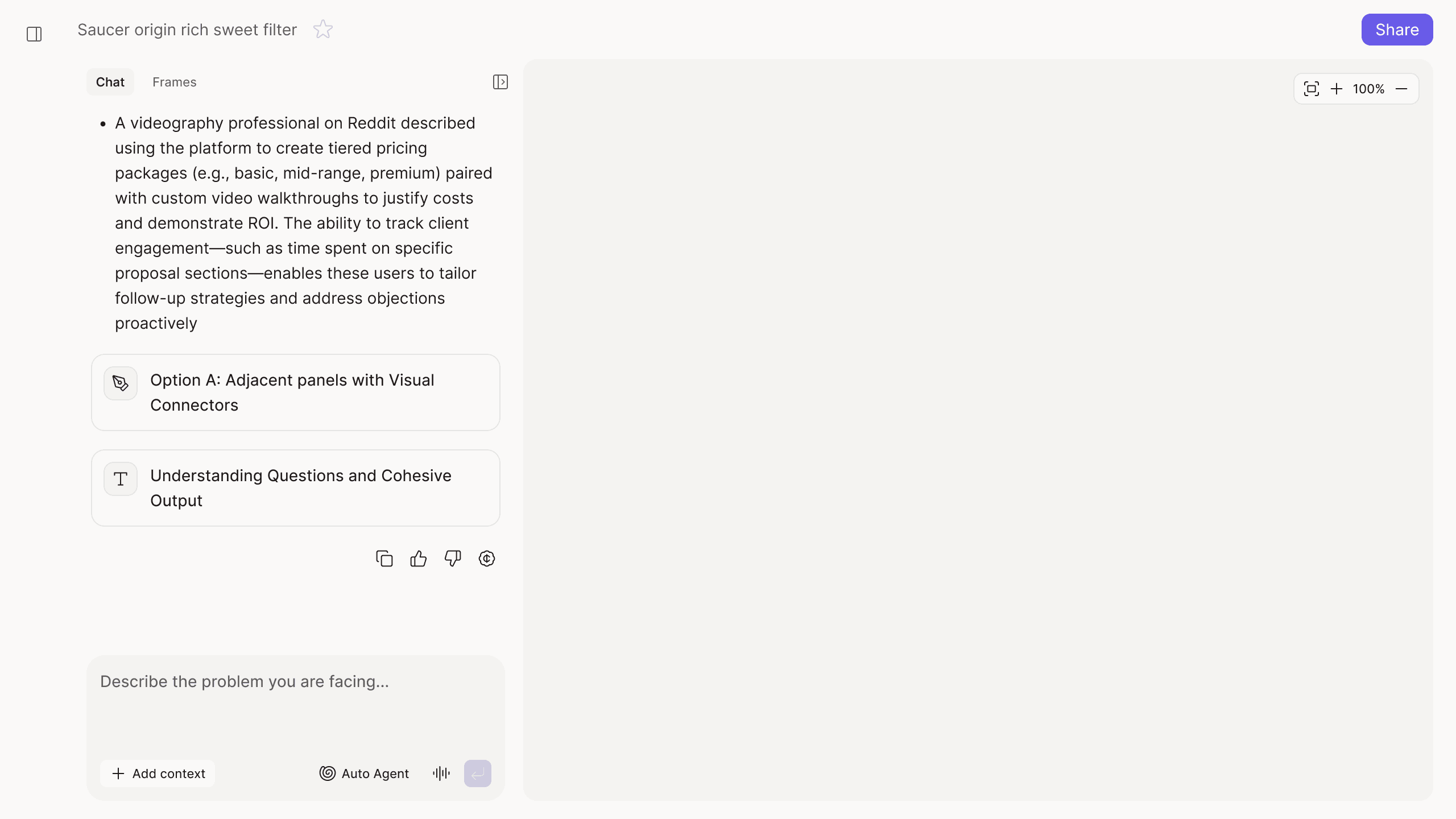
New Chat Sidebar and Layout
persistent context management
Every new canvas reset the team's briefing; reusable context later correlated with 3.9× as many queries
Inside one canvas, a team could upload screens, specifications and recordings, then spend time helping Figr understand the problem. The moment they opened another canvas, that understanding stayed behind. People re-uploaded the same material, repeated the same explanation and manually carried decisions to teammates.
Figr could remember a task. It still could not remember the product.
Canvas 1
Product Screens
Design System
Figma files
Analytics
Documents
Code Constraits
Product Decisions
User adds their context into one canvas to use and solve problems
Canvas 2
Add context again
User needs to start from zero again
Our first attempt was one organisation-level Markdown file. It could hold a company summary, but product understanding was richer than a summary: a screen showed the current state, a recording explained the journey, a document captured constraints and an earlier canvas held decisions. Flattening all of that into one file stripped away useful detail.
That led to Context Pods: shared Product Context that could move across canvases and teammates.
Context Pod
Canvas

Initial flow for product context
Market Research & References
A Pod held documents, links, screens, recordings and useful outputs from earlier canvases. Existing knowledge informed new work; new decisions strengthened the next task.
Screen recording became a high-bandwidth input. A screenshot showed a state; a recording showed how someone reached it and where the experience broke down. Users could walk Figr through the product as they would with a new teammate, then verify its interpretation.
82% of users who added a recording queried within seven days. Users who selected a Context Pod made 3.9× as many queries on average as those who never selected one.
The relationship was correlational, but it pointed to where reusable context mattered most: recurring, context-heavy work.
Progressive sheet to bifurcate input types for easy setup, & to showcase breadth of inputs
Easy management to tabbed approach
screens importance in Design Systems
Reference screens captured the look, but not the rules behind it; Figr had to learn intent, not just style
Teams could describe their visual style or attach a reference screen. The result might look close at first glance, then fall apart in the details: the wrong button variant, an inconsistent corner radius or an input pattern used outside its intended context. Designers still had to translate an approximation back into the real system.
The source material was not always clean either. The same button appeared in different contexts, radiuses conflicted between screens and similar inputs followed different rules. A naïve import could turn an old inconsistency into a new standard.
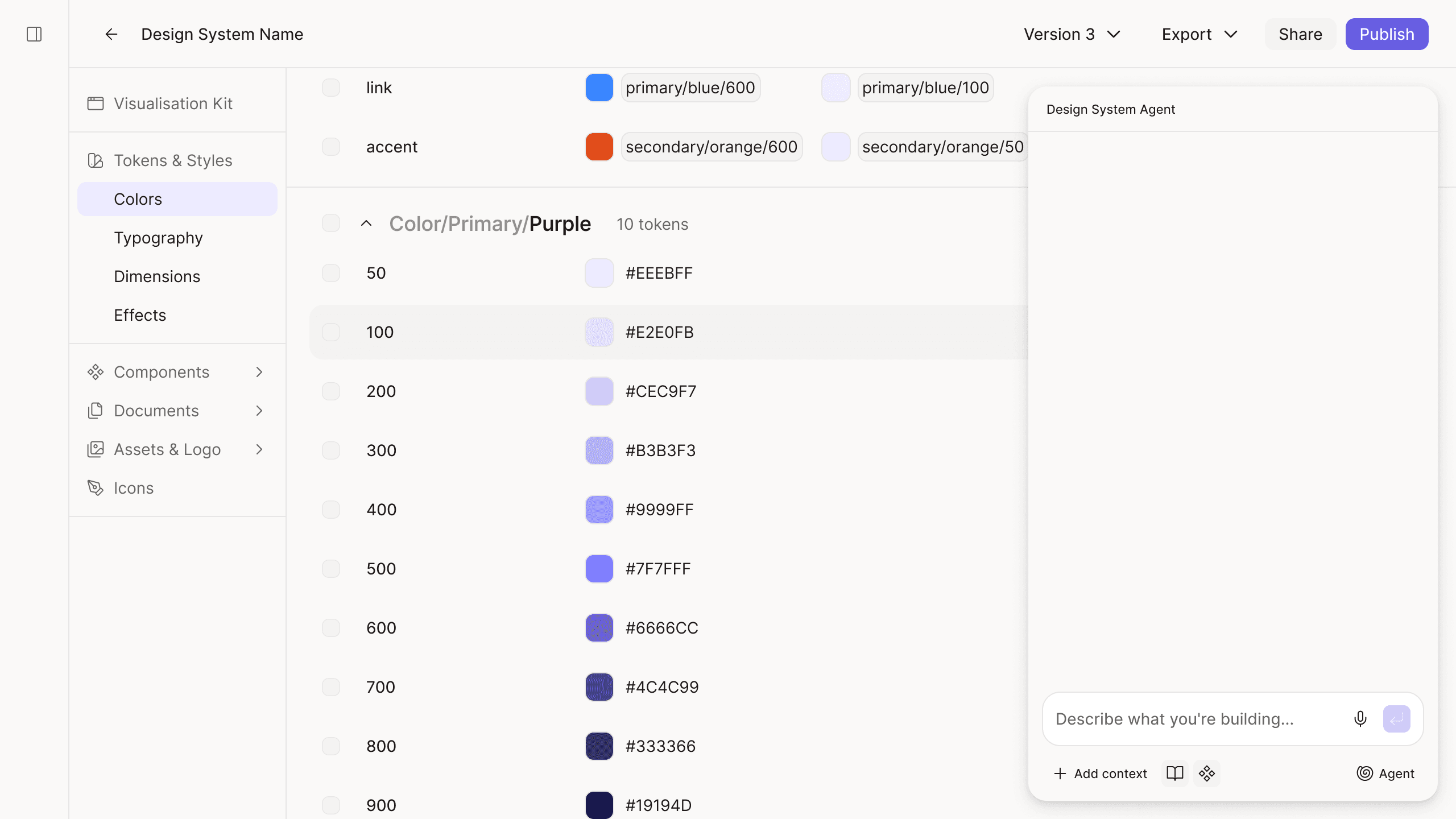
That was why Design System became a specialised context layer, separate from general Product Context. It needed to understand tokens, components, variants and usage—not merely collect visual references.
Stepped approach for Design System Setup

Management & Maintenance of Design System
Figma and code were used almost equally as starting points, supporting both as first-class sources. When button variants, corner radiuses or input patterns differed, Figr asked which usage was intentional instead of quietly turning a guess into a rule.
simplifying user flow along with development
Setup friction forced two different cuts: fewer choices for variables, and enterprise-only component imports
The first import flow mirrored Figma too literally. After choosing a variable collection, users still had to select the individual variables inside it. That precision added another decision layer before users saw value, so we removed it: users chose the relevant collections and Figr imported the variables within them together.
Components required a different decision. Importing them with enough fidelity to understand variants, states and usage carried a much higher technical and setup cost. We could not make that experience both trustworthy and economically viable as an open self-serve flow, so component setup moved into the enterprise plan while collection-based variable import remained self-serve.
One friction problem was solved by simplifying the interaction. The other needed a clear product and business boundary.
Too many unnecessary control to user for very little value
friction in the design system setup
The design-system value appeared after setup: 89% queried, but only 26.32% completed the flow
89% of users who selected a design system submitted a query within seven days. Their systems were reaching active work rather than becoming setup artifacts.
Only 26.32% of people who started creating a design system completed the flow. The steepest drop came while choosing and connecting a source.

Seeing drop-off in Mixpanel
We had designed valuable depth after setup, then asked people to trust that value before they could see it.
explain source choices sooner;
preview imported content earlier;
let partial systems produce useful output;
deepen documentation through use, not only upfront setup.
learnings & reflections
What looked like three features became one architecture for helping Figr remember what mattered
Layer
Its responsibility
Agent
Make AI work visible, inspectable and steerable
Product Context
Preserve knowledge across tasks and teammates
Design system
Ground interfaces in the product's actual components and rules
Together, the layers changed the starting point of every query. Figr could begin with what the team had already shown, built and decided—not only what someone could fit into the current prompt. Two lessons stayed with me,
A coherent model matters more than a longer feature list. Agent, memory and design-system import became clear once we treated them as one continuity problem.
Depth after activation cannot compensate for friction before it. The strongest signals appeared after setup; the 26% completion rate showed the product had to demonstrate value sooner.
The important shift was not giving Figr more intelligence. It was teaching the product what not to forget.
Once Figr could understand a team's product, the next challenge was making that difference visible before anyone signed up.